

Product Reviewed: Make.com (formerly Integromat)
Author: Abdellatif Al Ahyane – Cartora.io
INTRODUCTION
Still copying data between apps?
A new lead arrives in a form.
You open the CRM.
Paste the data.
Send a Slack message.
Update a spreadsheet.
That’s not productivity. That’s manual work disguised as automation.
Most small businesses run their operations across multiple tools:
CRM platforms
email marketing software
project management tools
analytics dashboards
customer support systems
Without automation, those tools create workflow chaos.
This is where Make enters the picture.
Make is a cloud automation platform designed to connect apps and build automated workflows between them.
Instead of moving data manually, Make lets you create visual automation scenarios that run automatically.
The promise is simple:
Less manual work.
More scalable workflows.
But does Make actually deliver in 2026?
Let’s break it down.
TABLE OF CONTENTS
- What Is Make Automation
- Key Features
- Feature Ratings
- Pricing
- Pros and Cons
- Best Use Cases
- Make Alternatives
- Is Make Worth It
- Final Rating
- FAQ
WHAT IS MAKE AUTOMATION
Make (formerly Integromat) is a workflow automation platform.
Its purpose is simple:
Connect apps and automate processes between them.
Instead of writing code, users create visual automation scenarios.
Each automation scenario works like this:
Trigger → Action → Result.
Example workflow:
New customer order
→ CRM record created
→ invoice generated
→ Slack notification sent.
Make belongs to the category of no-code automation tools, alongside platforms like:
Zapier
n8n
Pabbly Connect
But Make differentiates itself through one key concept:
Visual automation design.
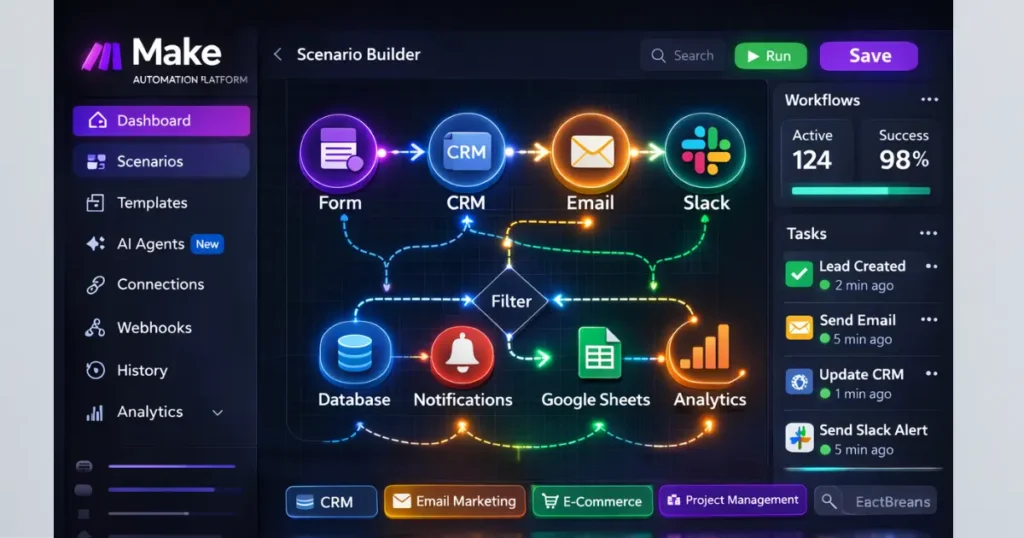
Users build automation systems using a graphical workflow builder.
This allows advanced automation logic such as:
conditional paths
routers
filters
data transformations
API requests
In other words, Make is designed for serious automation workflows, not just simple triggers.
KEY FEATURES
Make offers several powerful capabilities that go beyond basic automation tools.
Visual Workflow Builder
Unlike linear automation tools, Make uses a visual canvas.
Users can see exactly how data flows between apps.
This makes building and debugging workflows much easier.
Multi-Step Automation
Many automation tools limit the number of actions in a workflow.
Make supports complex multi-step automation including:
branching logic
conditional filters
multi-path automation
parallel processing
This allows businesses to automate entire operational pipelines.
Massive Integration Library
Make supports hundreds of integrations including:
Google Workspace
Slack
Airtable
Shopify
HubSpot
Stripe
Notion
If an integration does not exist, Make allows connections through:
webhooks
custom APIs
HTTP modules
This flexibility makes Make extremely powerful.
Data Transformation
Automation often breaks because different tools use different data formats.
Make includes built-in tools to transform data between steps.
Examples include:
date formatting
text manipulation
record filtering
JSON restructuring
Scheduling and Monitoring
Make allows workflows to run:
instantly
every few minutes
daily
on custom schedules
Users can monitor scenario runs, track errors, and debug automation pipelines.
FEATURE RATING TABLE
| Feature | Rating |
|---|---|
| Ease of Use | ⭐⭐⭐⭐ |
| Automation Power | ⭐⭐⭐⭐⭐ |
| Integrations | ⭐⭐⭐⭐ |
| Business Value | ⭐⭐⭐⭐ |
| Scalability | ⭐⭐⭐⭐⭐ |
PRICING
Make pricing is based on operations.
An operation is a single automation action.
Example:
Sending data from a form to a CRM counts as one operation.
Pricing Overview
| Plan | Price | Best For |
|---|---|---|
| Free | $0 | Testing automation |
| Core | ~ $9/month | Small businesses |
| Pro | ~ $16/month | Advanced workflows |
| Teams | ~ $29/month | Growing teams |
Compared to many competitors, Make becomes more affordable at scale.
However, heavy automation workloads can still increase costs.
PROS AND CONS
| Pros | Cons |
|---|---|
| Powerful automation engine | Learning curve for beginners |
| Visual workflow interface | Interface can feel complex |
| Flexible integrations | Documentation sometimes confusing |
| Affordable pricing | Debugging large scenarios takes time |
BEST USE CASES
Make becomes extremely powerful when businesses need multi-step automation systems.
Here are some real-world examples.
Lead Generation Automation
Workflow example:
Form submission
→ Lead added to CRM
→ Slack notification
→ Welcome email sent.
This removes manual lead management completely.
Marketing Automation
Workflow example:
New customer
→ Added to email list
→ Marketing campaign triggered
→ CRM updated.
Marketing teams save hours managing campaigns.
E-Commerce Automation
Workflow example:
New order
→ Generate invoice
→ Update inventory
→ Notify team.
Automation ensures operations scale smoothly.
Data Synchronization
Many businesses use multiple databases.
Make can synchronize data between tools such as:
Airtable
Notion
Google Sheets
CRM systems
MAKE ALTERNATIVES
Make operates in a competitive automation market.
Here are the main alternatives.
Zapier
Zapier focuses on simplicity.
Its interface is beginner-friendly and integrates with thousands of apps.
However, advanced automation logic is more limited compared to Make.
n8n
n8n is a developer-friendly automation platform.
It supports powerful automation logic but requires more technical knowledge.
Pabbly Connect
Pabbly Connect offers automation at a lower cost.
However, its ecosystem and integrations are smaller.
IS MAKE WORTH IT?
Make is one of the most capable automation platforms available today.
But it’s not perfect.
Beginners may struggle with the visual workflow interface.
Complex scenarios require time to design.
However, if your business relies heavily on automation, Make offers major advantages:
powerful workflow logic
flexible integrations
scalable automation systems
For businesses serious about automation, Make often becomes a better long-term platform than Zapier.
TOOL RATING
Make Automation — Overall Rating
Ease of Use: ⭐⭐⭐⭐
Automation Power: ⭐⭐⭐⭐⭐
Integrations: ⭐⭐⭐⭐
Pricing: ⭐⭐⭐⭐
Final Score: 9.1 / 10
FINAL VERDICT
Automation tools are becoming essential infrastructure for modern businesses.
Make stands out as a powerful platform for building scalable automation workflows across apps.
If your business depends on multiple SaaS tools, automation can eliminate hours of repetitive work every week.
Make is not the easiest automation platform to learn.
But once mastered, it becomes one of the most powerful productivity systems available.